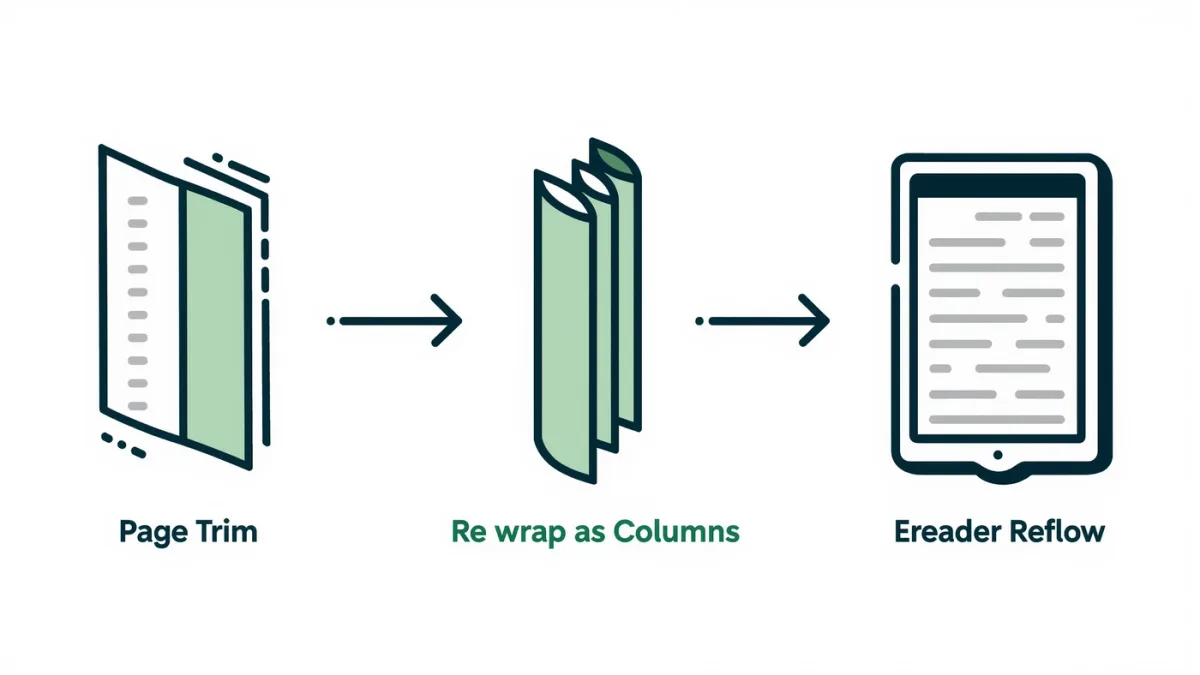
You fix the PDF before you blame the reader. PDFs are page-layout documents — fixed margins, fixed type size — so a letter-sized scan or an A4 academic paper arrives on a six-inch screen as shrunk-to-illegibility or panned-and-annoying. Three repair routes exist, in ascending order of aggressiveness: crop the margins so text fills the screen, reflow the text so the reader re-wraps it at your preferred size, or convert the whole document to EPUB with a tool like Calibre. Per Calibre's documentation, its PDF-to-EPUB conversion extracts text and rebuilds it as reflowable content — with accuracy that depends entirely on how the PDF was made.
What kind of broken is your PDF?
Diagnosis first, because the right fix depends on it.
- Text PDF with huge margins: born-digital text, selectable and searchable. Crop margins and font size is suddenly fine — the easy case.
- Two-column academic paper: born-digital but structurally hostile to small screens; reflow or conversion must understand column order.
- Scanned image PDF: pages are pictures of text. Nothing reflows; your options are a bigger screen, cropping, or OCR — Calibre can process PDFs, but scanned documents need OCR software first to gain real text.
What does margin cropping fix?
Most of the everyday problem, honestly. PDF reading apps and several e-reader platforms — including Kobo devices, per Kobo's documentation — offer cropping or margin adjustments when viewing PDFs; third-party desktop tools can also permanently crop pages, with auto-detect modes that find the text block and cut everything else. On a seven- or eight-inch reader, cropping an A4 paper to its text block often turns a squint into a comfortable read. Cropping does nothing for the eight-point footnote problem — the text is bigger but only proportionally — so it pairs best with devices where you can also zoom or rotate to landscape.
When should you reflow instead?
When the text itself is what matters, not the layout. Reflow extracts the reading order and re-wraps it at your chosen font size — the Kindle platform has long offered a reflow capability for personal PDF documents on capable hardware, and desktop tools like k2pdfovr-style optimizers (a well-known open-source category) re-paginate PDFs specifically for small e-readers, often dramatically better than naive conversion. The trade-offs: multi-column layouts can come out in the wrong order, tables and equations mangle, and page references to the original document are lost. Reflow is superb for novels-typeset-as-PDF and plain reports; it's the wrong tool for anything where the layout carries meaning.
When is conversion to EPUB the right move?
For text-heavy documents you'll read over days and want synced highlights, adjustable fonts, and dictionary lookups on. Calibre converts PDF to EPUB by extracting text and images; per its documentation, results range from clean to messy depending on whether the PDF has a sensible text layer, single or multiple columns, and how much structure survives. A quick check tells you: try selecting text in a desktop PDF viewer — if selection snaps cleanly to paragraphs, conversion has a chance; if it grabs columns sideways or nothing at all, expect cleanup work or OCR first. For scanned material, OCR tools like the open-source OCR engine family produce a text layer that can then be converted, with proofreading burden that scales with scan quality.
What about scanned PDFs — is OCR worth the trouble?
Depends entirely on how much you need to read. OCR — optical character recognition — turns pictures of text into a text layer, and modern open-source OCR engines do remarkably well on clean scans, less well on yellowed pages, tight gutters, and multi-column layouts with equations. The honest cost accounting: an OCR pass on a long document, plus the proofreading a careful reader will want on anything quoted, often exceeds the value of the document unless you'll read it repeatedly, search it, or need reflow for comfortable reading. For one-off journal articles, cropping on a large-screen reader usually beats the OCR project. For a personal archive you'll live inside for years, it pays.
What's the realistic playbook?
- Try cropping first — cheapest fix, no structural risk.
- Reflow if it's long-form text and layout doesn't matter.
- Convert to EPUB when you want real e-book features and the text layer is clean.
- Consider hardware honestly: if your reading is mostly A4 PDFs, no software repair fully substitutes for a 10-inch or larger reader — the tool solves inconvenience, physics decides legibility.
The PDF is never going to be native to e-ink, but with the right one of these three fixes, most documents read fine on hardware you already own.